
Bluehost and Squarespace can both get a professional website online, but they work differently.
Bluehost uses WordPress and gives you more moving parts to manage. Squarespace keeps those parts behind the curtain and gives you one polished system.
That distinction matters more than any isolated feature. If you want to design, publish, and move on, Squarespace is the smoother choice.
If you want a site you can extend, migrate, and reshape over time, Bluehost’s WordPress foundation is the stronger choice.
In this comparison, we’ll break down Bluehost and Squarespace across ease of use, design flexibility, customization, eCommerce, pricing, performance, SEO, and long-term value to help you choose the platform that best matches your needs.
Continue reading!
Table of Contents
- Quick Verdict: Bluehost or Squarespace?
- Bluehost: Web Hosting Built for WordPress
- Squarespace: An All-in-One Website Builder
- Bluehost vs Squarespace at a Glance (Features Comparison)
- How Toolphyra Evaluated These Platforms
- Ease of Use and Setup
- Templates and Design Flexibility
- Features and Integrations
- Blogging Comparison
- Bluehost vs Squarespace for SEO
- Performance, Security, and Maintenance
- eCommerce Comparison
- Bluehost vs Squarespace Pricing: The Real Cost
- Customer Support
- Bluehost vs Squarespace: Key Pros and Cons
- Best Platform by Use Case
- Bluehost or Squarespace?
- Frequently Asked Questions
Quick Verdict: Bluehost or Squarespace?
If you’re short on time, this quick comparison can point you in the right direction. See which platform best matches your priorities.
| Best fit for Bluehost | Best fit for Squarespace |
|---|---|
| You specifically want WordPress | You want the easiest path to a polished website |
| Plugins, themes, and custom code matter | Hosting, security, and design should live in one dashboard |
| You expect the site to become more complex | You prefer predictable, low-maintenance ownership |
| A low introductory price is worth a longer setup | Built-in selling, booking, and marketing tools matter |
Toolphyra’s recommendation: Choose Squarespace if you’re unsure. Choose Bluehost only when you already know you need WordPress.
Bluehost: Web Hosting Built for WordPress

Bluehost is a web hosting company that also serves as a beginner-friendly entry point into WordPress. Rather than selling raw server space, it pre-installs WordPress on every hosting plan, so a new site owner can start building right away instead of setting up software separately.
The platform’s purpose is to make WordPress hosting approachable. It handles server management, offers guided onboarding through its WonderSuite AI design tool, and bundles the essentials most sites need, including SSL, a CDN, and a free domain for the first year.
Bluehost is also one of the few hosts WordPress.org officially recommends, which carries weight with developers and beginners alike. In practice, its performance and usability sit comfortably in the middle of the market: reliable enough for most blogs and small business sites, though it asks for more hands-on involvement than a fully managed builder.
Squarespace: An All-in-One Website Builder

Squarespace is an all-in-one website builder that handles hosting, design, and security inside a single, closed platform. Instead of assembling separate pieces, you build directly inside Squarespace’s visual editor while the company manages everything running behind it.
Its purpose is to remove the technical decisions that typically slow down a website launch, so a business owner or creative professional can focus on content and design rather than servers or plugins. The platform covers most of what a small business needs out of the box, including scheduling, basic marketing tools, and integrated selling, designed to feel cohesive from day one.
Overall performance and usability lean strongly toward simplicity: templates look polished immediately, and updates and security happen automatically in the background. The trade-off is flexibility, since customization stays within the boundaries Squarespace has built rather than being fully open-ended.
Bluehost vs Squarespace at a Glance (Features Comparison)
The table below breaks down how Bluehost and Squarespace compare across the factors that matter most when picking a platform, from pricing and ease of use to SEO and long-term maintenance.
| Criterion | Bluehost | Squarespace | Winner |
|---|---|---|---|
| Best for | WordPress sites, scalable blogs, custom builds | Beginners, creatives, service businesses | Depends |
| Starting price | $3.99/mo introductory rate on a 36-month term | $16/mo billed annually | Bluehost |
| Ease of use | Moderate learning curve | Guided, visual, beginner-friendly | Squarespace |
| Design quality | Huge theme choice; quality varies | Cohesive, premium templates | Squarespace |
| Customization | Themes, plugins, builders, and code | Flexible inside a curated system | Bluehost |
| Blogging | Best for complex or growing publications | Excellent for simpler blogs | Bluehost |
| SEO | Deep control through WordPress plugins | Strong essentials built in | Bluehost |
| eCommerce | WooCommerce; highly expandable | Integrated and easier to launch | Depends |
| Maintenance | You manage more of the stack | Platform managed | Squarespace |
| Support | Live chat and phone | Email and weekday live chat, no phone | Bluehost |
| Beginner winner | Powerful, but more involved | Fastest route from idea to live site | Squarespace |
Prices shown are the rates available at the time of fact-checking. Always confirm the checkout total, term length, and renewal rate before purchasing.
How Toolphyra Evaluated These Platforms
This is a research-based comparison, not a claim of long-term hands-on use.
We evaluated Bluehost and Squarespace using their official pricing pages, product documentation, support policies, refund terms, feature descriptions, and publicly available homepage materials.
We then compared the factors that most directly affect a buying decision:
| Evaluation area | What we checked |
|---|---|
| Cost | Introductory pricing, standard rates, renewals, billing terms, and transaction fees |
| Ease of use | Setup steps, ongoing maintenance, and the number of technical decisions required |
| Design | Template quality, customization options, plugins, and code access |
| Growth potential | Blogging, SEO, eCommerce, integrations, and platform portability |
| Support and risk | Support channels, trials, refunds, security responsibilities, and lock-in |
We did not award a winner based on a single headline price or marketing claim. Recommendations are matched to user type: beginners, creators, WordPress users, publishers, service businesses, and online stores.
Product interfaces can change, and the screenshots in this guide come from the companies’ public homepages rather than authenticated customer dashboards.
With that methodology in mind, here’s how Bluehost and Squarespace actually compare across each category, starting with how each platform feels to set up and use.
Ease of Use and Setup
This is the category where the difference becomes obvious.
Squarespace keeps onboarding short: choose a starting design, add your content in the visual editor, and publish.
You can click directly into a section to change text or images, and there is usually no reason to think about servers, updates, or plugin conflicts.
Setting up Bluehost is not difficult, but it asks more of you. WordPress is installed automatically, and WonderSuite can suggest an initial design after a short questionnaire.
From there, however, you are in the WordPress world: choosing a theme, adding plugins, and deciding how updates will be handled.
For someone building their first website, Squarespace is simply less demanding. Bluehost becomes easier once you understand WordPress, but it still asks more of you along the way.
Templates and Design Flexibility
Squarespace has the stronger starting point. Its templates tend to use typography, spacing, and imagery well before you change a thing.
They are responsive by default, and site-wide controls make it easy to adjust fonts, colors, and spacing. Core and higher plans also allow custom CSS and code blocks.
If flexibility is your priority, though, Bluehost is difficult to beat. Since it runs on WordPress, you can choose from thousands of free and paid themes, install a page builder, or work directly with code.
The downside is consistency: theme quality varies, and reaching the same level of polish often takes more time.
Squarespace is more likely to look finished on day one. WordPress can ultimately take you much further, but only if you are willing to shape it.
Features and Integrations
Squarespace includes many of the tools a small business is likely to need: basic analytics, email campaigns, scheduling, member areas, and marketing features.
They feel cohesive because they were designed for the same platform. Its Extensions marketplace adds more options, though the selection is deliberately curated.
WordPress turns Bluehost into something broader. Plugins can add advanced forms, memberships, marketing automation, and thousands of niche functions.
That freedom matters when a site has unusual requirements. It also means researching plugins, checking compatibility, and sometimes paying several vendors instead of one.
In practice, Squarespace covers common needs with less friction. Bluehost makes more sense when your site requires more than common needs can cover.
Blogging Comparison
Your publishing ambitions should guide this choice.
A personal blog, company news section, or modest publication will feel at home on Squarespace. Categories, tags, scheduled posts, and comments are ready to use, and Core and higher plans support multiple contributors.
A serious content operation is another matter. WordPress has spent years evolving as a publishing system, and that depth shows in its taxonomies and contributor roles.
Newsletters, related-post systems, and custom editorial workflows can all be added as the publication grows.
For a blog that primarily supports another business, Squarespace is more than capable. If the blog is the business, or may become one, Bluehost and WordPress leave far more room to expand.
Bluehost vs Squarespace for SEO
Neither platform will make weak content rank simply because you chose it. The practical question is how much technical control you expect to need.
Squarespace handles the essentials without extra software: page titles, meta descriptions, clean URLs, XML sitemaps, image alt text, and SSL.
That is enough for many local businesses, portfolios, and smaller publications. What you do not get is the same freedom to shape advanced schema, robot directives, or complex redirects.
This is where WordPress earns its reputation. On Bluehost, plugins such as Yoast SEO and Rank Math can add schema controls, redirect tools, and more granular sitemap settings.
There is more power available, but it comes with more configuration.
Most owners will find Squarespace’s built-in SEO tools sufficient. Technical SEO specialists and larger content sites are more likely to appreciate WordPress.
Choosing the right SEO software is just as important as choosing the right website platform. Compare Ubersuggest vs Ahrefs to see which SEO toolkit offers the best keyword research and optimization features.
Performance, Security, and Maintenance
Owning a WordPress site means accepting a maintenance routine. The core software, themes, and plugins need updates, and someone needs to monitor backups and security.
Bluehost includes SSL and sells extras such as CodeGuard and SiteLock, but the day-to-day hygiene still belongs to you or the person managing the site.
Squarespace removes most of that work. Hosting, infrastructure, SSL, and platform-level security are managed centrally, so there is nothing to patch in the background.
For a solo business owner, that can matter more than another layer of customization.
There is no credible reason to manufacture a speed winner here: neither company publishes independent, comparable performance data for every plan.
The meaningful difference is responsibility. One platform lets you tune more; the other leaves you with much less to maintain.
eCommerce Comparison
For a small catalog, Squarespace’s integrated approach is appealing. Product pages, payments, and design all live in the same interface.
Every plan supports selling, but the fees matter: Basic adds a 2% commerce fee and a 7% digital-product fee.
Core, Plus, and Advanced remove the commerce fee, while digital-product fees fall from 5% to 1% and then to 0%. Squarespace Payments processing charges still apply regardless of plan.
Stores with unusual shipping rules, subscriptions, or a complex catalog will eventually run into the limits of an all-in-one builder.
Bluehost uses WooCommerce, a free WordPress plugin that adds no transaction fee of its own. Payment processors still charge their standard rates, and advanced capabilities often require paid extensions.
We would lean toward Squarespace for a straightforward store where simplicity matters most. WooCommerce is the more capable foundation when the store needs to evolve beyond standard products and checkout flows.
If you’re deciding between ecommerce platforms, don’t miss our in-depth WooCommerce vs Shopify comparison before choosing the foundation for your online store.
Bluehost vs Squarespace Pricing: The Real Cost
Bluehost pricing (WordPress hosting plans, 36-month term for the lowest rate):
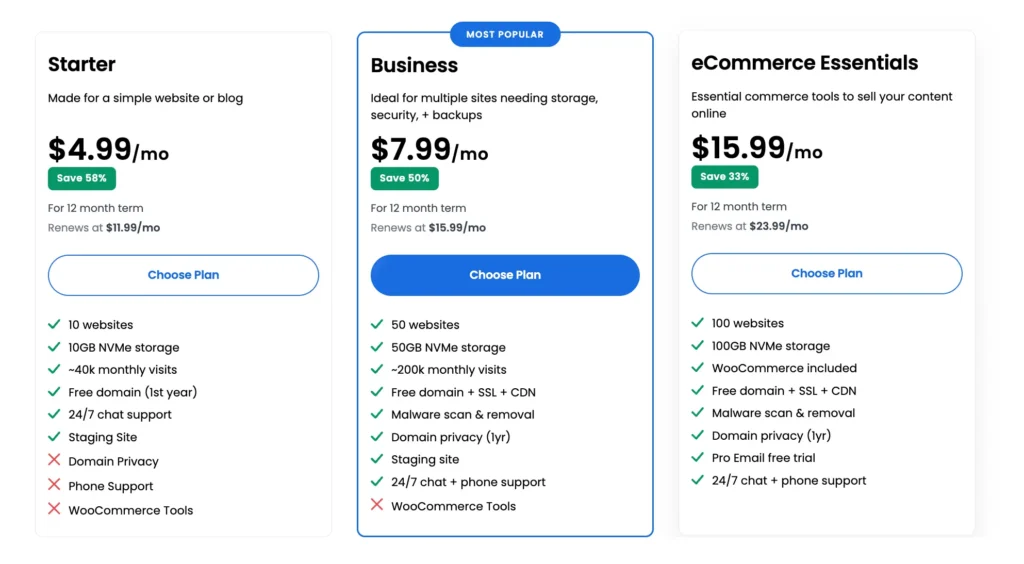
All Bluehost plans include a free domain for the first year (renews separately), free SSL, and a free CDN.
The lowest advertised rate requires the longest 36-month term. Shorter 12-month or monthly terms cost more up front and at renewal.
Bluehost’s 30-day money-back guarantee covers hosting fees only. Domains and add-ons like SiteLock or CodeGuard are non-refundable.
Squarespace pricing:
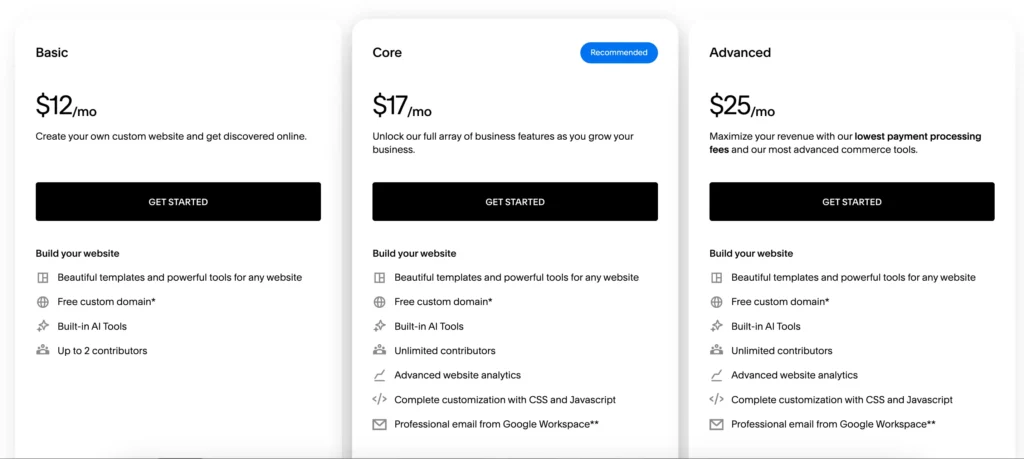
Squarespace’s annual billing is meaningfully cheaper than paying monthly, and a custom domain is included free for the first year on annual plans.
There’s no long-term contract beyond the billing cycle you choose, so you can cancel before renewal or switch billing frequency.
Budgeting rule: Compare Bluehost’s renewal price to Squarespace’s annual plan price. Those figures are much closer to your ongoing cost than a promotional headline.
Bluehost is cheaper at the entry level, even after the Starter plan renews. Squarespace costs more, but that premium pays for a cohesive editor, managed infrastructure, and more built-in functionality.
The better value depends on whether you would otherwise pay for premium WordPress themes, plugins, backups, security, or developer help.
Customer Support
Support may be the deciding factor if you prefer to explain a problem aloud.
Bluehost provides live chat alongside phone support, with published phone hours from 7 a.m. to midnight Eastern Time. Its help center covers routine account and WordPress questions.
You cannot call Squarespace. The company favors screenshot-based troubleshooting through email and chat, offering 24/7 email support and live chat on weekdays.
There is also a substantial help center and community forum.
Neither setup is inherently poor, but they suit different people. Choose Bluehost for phone access, Squarespace if you’re fine documenting an issue in writing.
Bluehost vs Squarespace: Key Pros and Cons
Here’s a side-by-side summary of what each platform does well and where it falls short, before the full verdict.
| Platform | Advantages | Limitations |
|---|---|---|
| Bluehost | Low introductory cost, full WordPress ecosystem, free domain/SSL/CDN for year one, phone and chat support | Noticeable renewal increase, hands-on plugin and update management, longest commitment unlocks the lowest rate |
| Squarespace | Managed hosting, consistently polished templates, integrated commerce/blogging/marketing, 14-day trial | No phone support, less freedom beyond its ecosystem, higher starting price, no WordPress compatibility |
Best Platform by Use Case
Different site owners have different priorities, so here’s how each platform stacks up depending on what you’re actually building.
- Complete beginners: Squarespace, widely considered a top pick for beginners thanks to its guided editor and zero setup
- Bloggers: Squarespace for a quick, low-maintenance blog; Bluehost for scaling into a larger content operation
- Small businesses: Squarespace wins on simplicity, while Bluehost wins if you already rely on WordPress
- Portfolios and creatives: Squarespace, for its design-forward templates
- WordPress users: Bluehost, built specifically around WordPress hosting
- Service businesses: Squarespace, for built-in booking and contact tools
- Simple online stores: Squarespace, for unified store setup and payments
- Larger or highly customized sites: Bluehost, through WordPress and WooCommerce
- Users who want minimal maintenance: Squarespace
- Users who want maximum control: Bluehost
Bluehost or Squarespace?
Most first-time site owners will be happier with Squarespace. It removes decisions that tend to slow down a launch, and its templates make it easier to produce something polished without hiring a designer.
Bluehost becomes a more interesting option once your requirements are specific: a content-heavy publication, a deeply customized business site, or a WooCommerce store with unusual workflows.
In those cases, WordPress’s flexibility is worth the extra maintenance.
The simplest way to decide is to ask what you would regret more: being limited by your platform later, or spending extra time managing it now.
Choose Bluehost to avoid the first problem. Choose Squarespace to avoid the second.
Frequently Asked Questions
Is Bluehost better than Squarespace?
It depends on your needs. Bluehost is better for full control over WordPress themes, plugins, and site architecture.
Squarespace is better for an all-in-one builder with less setup and no server management. Neither is universally better; they solve different problems.
Is Squarespace easier to use than Bluehost?
Yes, for most beginners. Squarespace’s drag-and-drop editor and managed hosting mean nothing to install or update.
Bluehost requires you to set up and maintain WordPress yourself, which involves more decisions and a steeper initial learning curve.
Can I use Squarespace with Bluehost?
No. Squarespace is a self-contained platform with its own hosting, so it can’t run on Bluehost’s servers.
WordPress hosted by Bluehost is a separate setup from a Squarespace site, and the two aren’t compatible with each other.
Is Bluehost or Squarespace better for SEO?
Both cover the fundamentals: editable titles, meta descriptions, and sitemaps.
Bluehost, through plugins like Yoast or Rank Math, offers deeper technical SEO control. Squarespace’s built-in tools handle standard on-page SEO well but offer less advanced technical customization.
Which is better for blogging?
Squarespace is better for a simple, low-maintenance blog thanks to its built-in tools.
Bluehost, through WordPress, is better for advanced or scaling publishers who need extensive customization and plugin-based content workflows.
Which is better for a small business?
Squarespace suits small businesses that want a professional site with booking, eCommerce, and marketing tools bundled together.
Bluehost suits small businesses already invested in WordPress, or that need custom functionality a builder can’t offer.
Which is cheaper after renewal?
Bluehost’s entry-level renewal price ($9.99/mo on Starter) is lower than Squarespace’s cheapest annual plan ($16/mo on Basic).
But Bluehost’s renewal jumps are steep relative to its intro price, so compare renewal rates directly rather than intro pricing alone.
Can I move from Bluehost to Squarespace?
You can rebuild a site on Squarespace using content exported from WordPress, such as posts and images, but there’s no one-click migration between the two, since they use entirely different systems.



Leave a Reply